Balatro Mod Manager Free Download for PC
Get the official Balatro Mod Manager for Windows to browse, install, update, and back up Balatro mods from one retro-styled desktop app.
Balatro Mod Manager
Core framework used by a large share of Balatro mods. BMM can fetch versions and keep the dependency chain clean.
Tracked as a core dependency with version prompts, update notices, and repository access from the same app view.
Example catalog card with the striped Balatro look, one-click download action, and quick collection controls.
What Is Balatro Mod Manager?
Balatro Mod Manager is a free, open-source tool for managing mods in Balatro, the open-source desktop utility that helps Balatro players install mods, track versions, build collections, and recover from bad loadouts with backups.
Built for Balatro players, not generic file juggling
Balatro Mod Manager is a dedicated app by skyline69 for people who want to play modded Balatro without managing every ZIP, dependency, and backup by hand. The app pulls mod details into one interface, gives you search and category tools, and keeps install actions close to the mod card so you do not bounce between browser tabs, folders, and the game directory. That focused workflow is the main reason the tool stands out from ordinary archive managers or do-it-yourself install guides.
The official site describes it as a standalone manager for finding, downloading, and installing Balatro mods. The source tree and the live app confirm that the real workflow goes further than a simple downloader. You can browse a catalog, detect local mods, store collections, review dependency prompts for projects like Steamodded and Talisman, and move through separate views for Mods, Backups, Settings, and About. For a game with an active mod scene, that saves time every time you change a load order or try a new pack.
A cleaner mod workflow with fewer broken sessions
One strong reason to use Balatro Mod Manager is the backup layer. Before you make a big change, you can save the current state, test new installs, and roll back if a combination causes problems. That matters for Balatro because many players stack content packs, Joker packs, resource changes, and framework updates over time. The app also keeps local detection and collections close to the main catalog so you can see what is already installed and group your preferred sets for fast switching.
Open source, public releases, and a clear release trail
The latest public download build is v0.4.1, released on 2026-05-30 on GitHub. The main branch in the source repo already points to 0.4.1, which shows active development, but the public download page still points to v0.4.1. That is why the safe recommendation for most users is simple: download the current release build, keep an eye on the official release page for new tags, and avoid third-party mirrors that do not match the official asset list.
Key Features That Matter In Daily Use
Balatro Mod Manager is more than a launcher. Its strongest features focus on real mod pain points: version drift, missing dependencies, hard-to-track folders, and the need to roll back when a setup stops working.
Catalog Search And Category Filtering
The app exposes a searchable catalog with filters that map to real Balatro mod categories such as Joker, Technical, and Collections. That keeps discovery inside one window and cuts down on guesswork when you are trying to find a specific author, pack, or framework.
One-Click Install Actions
Every major card action is close to the mod itself, which means install, update, remove, and collection actions do not depend on manual file extraction. This is the core convenience win for anyone who wants to test several mods in one session.
Dependency Prompts For Common Frameworks
The source and live UI show dependency handling for projects such as Steamodded and Talisman. When a mod relies on one of those building blocks, the app can surface that requirement before you end up with a broken game boot.
Collections For Repeatable Loadouts
Collections help when you want one stable pack for regular play and another for testing experimental content. Instead of remembering every folder and file state, you can keep grouped setups close to the main manager workflow.
Backup And Restore Tools
Backups are one of the most useful trust features on the official site and in the app structure. They give you a clear rollback point before a large mod swap, framework update, or cleanup pass, which is much safer than hoping you remember every file you changed.
Local Mod Detection
The app does not assume it installed every file you use. Local detection helps it see what is already on disk, which makes migrations and manual cleanups easier when you move from a hand-managed setup into Balatro Mod Manager.
Version Tracking And Update Prompts
Version awareness matters because Balatro frameworks change and some mods depend on exact releases. Balatro Mod Manager can surface update states in the same place you install content, which gives you a faster path from diagnosis to fix.
Cross-Platform Packages
Windows users get native installer options, macOS users get a universal DMG, and Linux users get multiple package formats. That wide release spread is unusual for a niche game utility and makes the tool easier to recommend across different Balatro communities.
System Requirements
The official project confirms platform support and package formats. CPU, RAM, and display guidance below is practical sizing based on the Tauri desktop build, the app’s default 1035 by 750 window, and normal Balatro mod workflows.
| Component | Minimum | Recommended |
|---|---|---|
| Operating System | Windows 10 or Windows 11 x64, macOS 11 or later, or a 64-bit Linux desktop | Windows 11 x64, macOS 13+, or Linux with the Steam version of Balatro and Flatpak available |
| Processor | Any 64-bit CPU that meets your operating system baseline | Modern dual-core or better for faster app startup and smoother large catalog work |
| Memory | 4 GB RAM | 8 GB RAM if you keep several backups, collections, and mod archives on hand |
| Disk Space | 100 MB for the app plus room for downloads, extracted mods, and backups | 1 GB free so backups and package files do not crowd the Balatro install |
| Graphics | No dedicated GPU required | Any GPU that already runs desktop Balatro without UI scaling issues |
| Display | 1280 x 720 usable desktop space | 1440 x 900 or higher so the full manager window and catalog fit comfortably |
| Internet | Needed for browsing official releases, catalogs, and update checks | Stable connection during first setup and large mod library syncs |
Verified platform notes: macOS builds require 11.0 or later, Linux support is aimed at the Steam version of Balatro, and Xbox Game Pass installs are not supported.
If your goal is a Windows install, the normal x64 setup EXE is the safe first choice. Linux users should expect the smoothest path with Steam plus Flatpak, while macOS users should use the universal DMG from the official v0.4.1 release page.
Download Balatro Mod Manager
The current public release is Balatro Mod Manager v0.4.1 from 2026-05-30. Download from the official website or the matching GitHub release tag so file names and sizes line up with the public asset list.
Windows x64
Recommended for most players. The official release offers both a setup EXE and an MSI package, with the EXE staying closest to the normal desktop install path.
- EXE installer: Balatro.Mod.Manager_0.4.1_x64-setup.exe
- MSI package: Balatro.Mod.Manager_0.4.1_x64_en-US.msi
- Best fit for Windows 10 and Windows 11 desktop systems
macOS Universal
The official macOS build ships as one universal DMG, which means Intel and Apple Silicon users pull from the same release asset. The Tauri config sets macOS 11.0 as the minimum supported version.
- File: Balatro.Mod.Manager_0.4.1_universal.dmg
- Universal package for Intel and Apple Silicon Macs
- Use the official release page for the current notarized package trail
Linux Flatpak And AppImage
Linux users get several release formats, but the project notes that Flatpak is the recommended route. Linux support is intended for the Steam version of Balatro, not a Game Pass-style install.
- Flatpak: balatro-mod-manager.flatpak
- AppImage: Balatro.Mod.Manager_0.4.1_amd64.AppImage
- Flatpak is the first-choice path on Steam Deck style setups
Linux DEB And RPM
If you want native package files instead of a portable image, the same public release includes standard DEB and RPM assets. These are best for users who already know their distro package flow and still run Steam Balatro.
- DEB: Balatro.Mod.Manager_0.4.1_amd64.deb
- RPM: Balatro.Mod.Manager-0.4.1-1.x86_64.rpm
- Use only if your distro path is easier with native packages than Flatpak
What's new in Balatro Mod Manager v0.4.1
Changelog
All notable changes to Balatro Mod Manager.
[0.4.1] - 2026-05-30
🚀 Features
- Enable native Wayland by default with automatic crash recovery
- Add GPU fallback chain (DMABUF → Vulkan → OpenGL → software)
- Add fade-in transition to mod view descriptions
- Add network status store for offline mode support
- Add error mapping utility for user-friendly messages
- Add health checks and state recovery commands
- Add atomic staging for mod extraction
- (about) Add status page button and external-link tests
- Add Umami analytics integration
- Detect and surface mods removed from remote index
- (ui) Add Submit Mod tab
- (search) Fuzzy mod search with typo tolerance and ranking
🐛 Bug Fixes
- Bulk uninstall now properly deletes mod files
- Sync mods to Proton prefix on Steam Deck when Mods dir exists
- Prefer longer description to avoid truncation (#355)
- Handle lenient JSON parsing in mod detection
- Improve Steam detection for Flatpak sandbox
- Auto-cleanup empty directories in Mods folder
- (tests) Resolve $lib alias and localStorage issues in CI
- (tests) Import afterEach in Settings test
- (windows) Prevent blank screen and hidden window on startup
- (clippy) Drop redundant .into_iter() on stream::iter arg
- (mods) Sync enabled state with Steamodded for nested mod folders
- (settings) Default compat helper toggle to off before settings load
- (popup) Watchdog releases stuck transition blocker
- (perf) Hoist LazyImage state into shared singletons
- (mods) Deduplicate mod entries to prevent each_key_duplicate crash
- (images) Prevent load-slot leak that causes all thumbnails to vanish
- (mods) Stop UI freeze when toggling a mod on/off
- (installer) Keep all top-level dirs when extracting mod zips
- (mods) Show all enabled mods in Installed Mods tab
💼 Other
- Switch macOS bundles to ad-hoc signing
🚜 Refactor
- Extract shared catalog loading logic and add mod details cache TTL
⚡ Performance
- Defer non-critical startup tasks to background
- Defer startup tasks and optimize network requests
- Cache mod details to disk to avoid repeated API calls
- Persist Lovely version cache to disk across restarts
- Remove duplicate fetch_repo_mods call on startup
- Pre-fetch mod requirements on view open
- Close performance and stability gaps across stack
🧪 Testing
- Add unit tests for command modules
- (backups) Cover BackupsPanel actions and states
- (settings) Add action-level coverage for Settings view
- (mods) Add BulkActionBar selection-action tests
⚙️ Miscellaneous Tasks
- Update dependencies
- Update version
- Update dependencies
- Update dependencies
- Update dependencies
- Update dependencies
- (lint) Ban unsafe type annotations
- Update dependencies
- Update dependencies
- Update more dependencies
- Bump GitHub Actions off the deprecated Node 20 runtime
- Bump version to 0.4.2
- Revert version to 0.4.1
❓ FAQ Q: How do I know this isn't malware? A: Check the source code and verify the digital signature details.
Release notes from the GitHub release page, published May 30, 2026.
Balatro Mod Manager In Action
Real screenshots from the Balatro Mod Manager desktop app — showing the mod catalog, collections, installed mods, search, and about views.
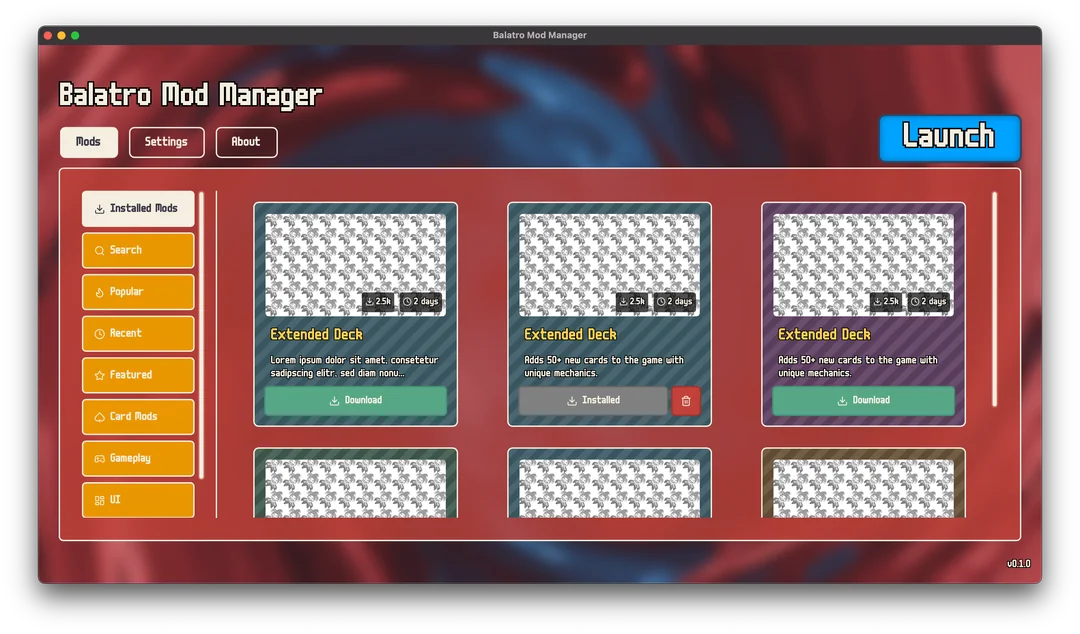 Mod catalog with download and install cards
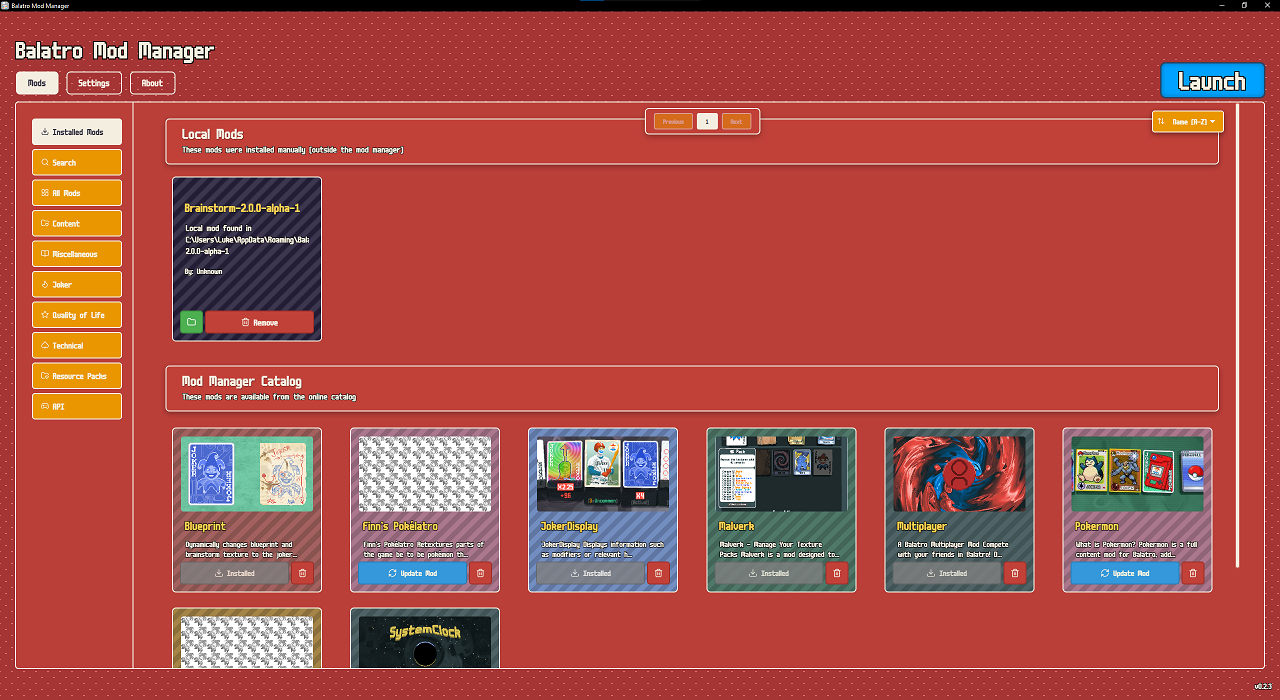 Installed mods with local detection and online catalog
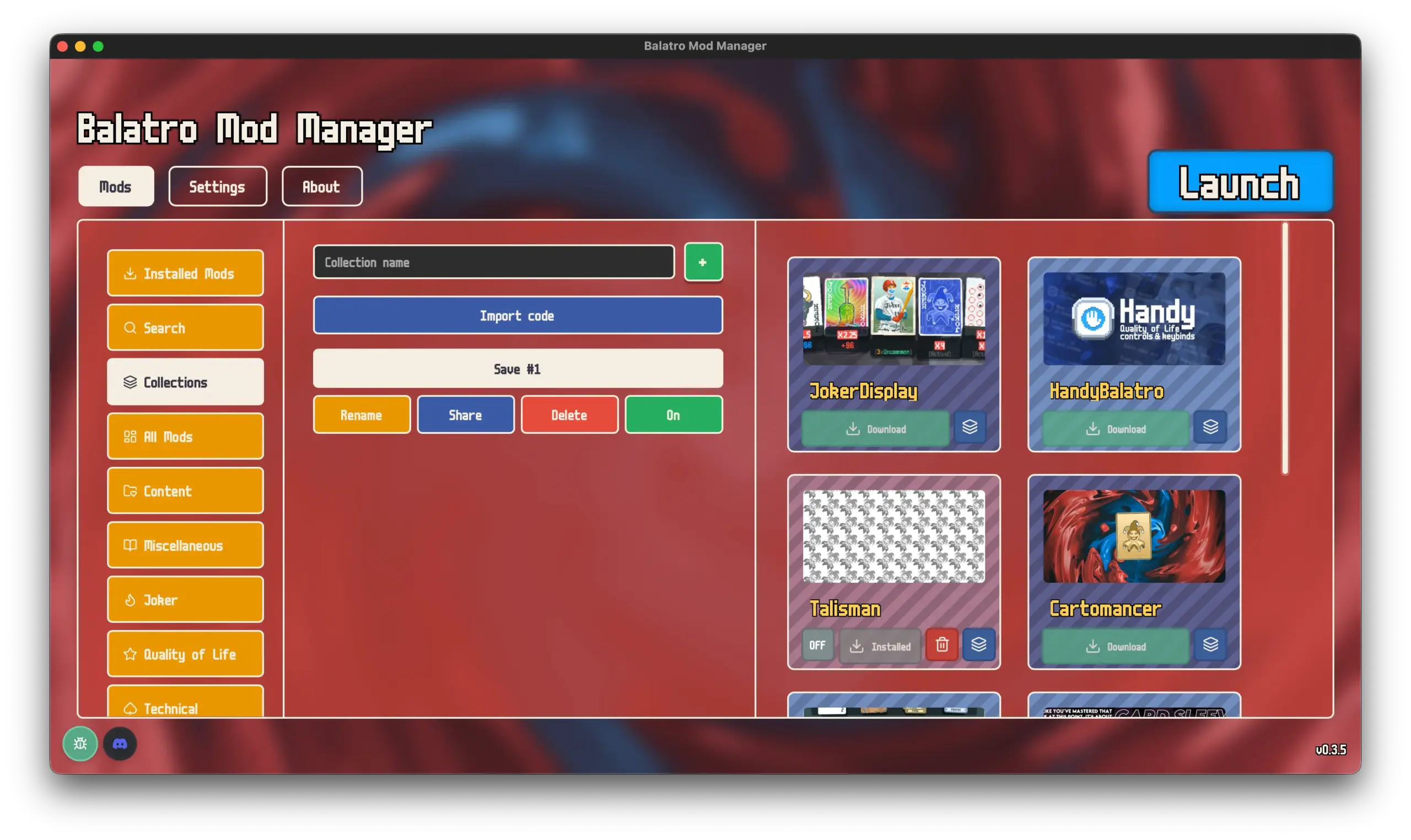 Collections view with save management and mod cards
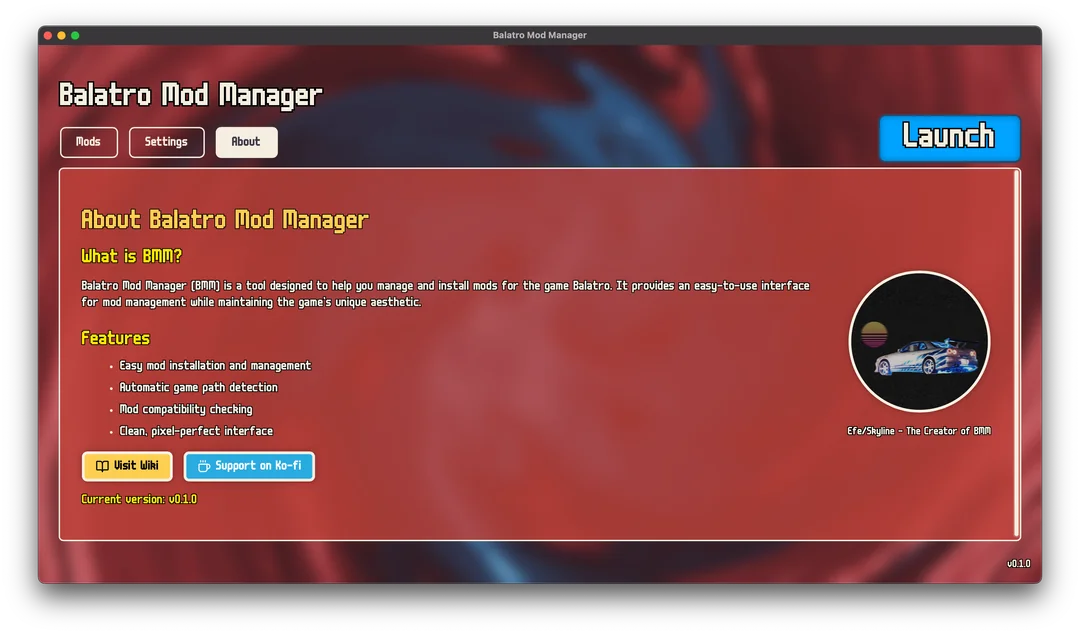 About page with features and developer info
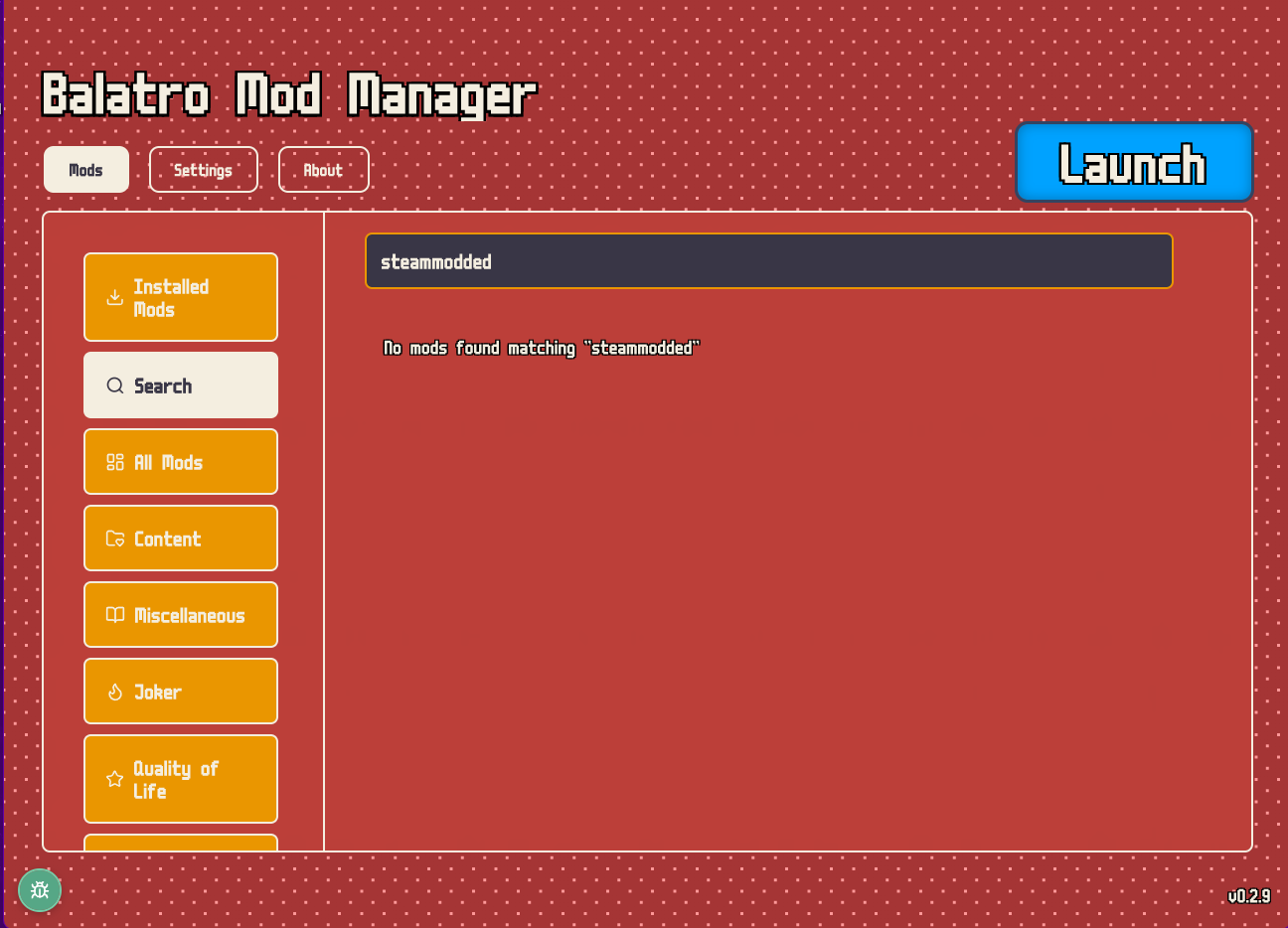 Search interface with category sidebar
Getting Started With Balatro Mod Manager
A good first setup keeps the install path clean, pulls the right framework pieces, and gives you a backup before you start mixing content packs. These steps are based on the official release packages, the documented platform notes, and the app layout visible in the current build.
Download the package that matches your system
Start with the official v0.4.1 release. On Windows, the x64 setup EXE is the most direct path because it matches how most desktop users install game utilities. The MSI is there if you specifically want that packaging style. On macOS, use the universal DMG and confirm your Mac is on macOS 11 or newer. On Linux, read the project note first: support is aimed at the Steam version of Balatro, and the project recommends Flatpak. If you are using the Xbox Game Pass edition of Balatro, stop here because the manager is not designed for that install path.
Install the app and let it locate Balatro
Once the app opens, the first goal is path confirmation. A manager like this only helps if it knows where your actual Balatro files live. Windows users should normally let the app detect the Steam install automatically, then confirm that the detected folder matches the game they launch every day. macOS users should check the Steam app path if they keep multiple libraries. Linux users should expect a Steam-first flow, especially under Flatpak, because the project code and notes point to Steam and Proton aware path handling instead of open-ended custom installs. If detection misses, correct the path before installing any mod.
Set up the framework pieces before adding large mod packs
Many Balatro mods depend on framework layers such as Lovely, Steamodded, or Talisman. Balatro Mod Manager is useful because it exposes those relationships instead of leaving you to discover them through a crash or missing content in game. If the app offers to install or update a framework dependency, handle that first. Then launch Balatro once, confirm that the base game still opens, and return to the manager. That simple test pass saves time because it tells you the foundation is healthy before you add content packs, Joker packs, or technical mods that rely on those same pieces.
Use search, local detection, and collections to build your loadout
From here, move into the Mods view and use the search field or category rail instead of dropping files into the game folder by hand. If you already installed anything manually, let local detection show what the manager can see. That reduces duplicate installs and helps you spot old framework files that should be updated or removed. When you find a stable set that you want to keep, group it into a collection. Collections are especially helpful if you bounce between a safe everyday setup and a more experimental test setup because you do not need to remember every individual folder involved.
Make a backup before each major change and keep your release source clean
Before you update a framework, add a large content pack, or remove several mods at once, create a backup inside the manager. That turns troubleshooting into a short rollback instead of a full rebuild. If a mod set starts failing, restore the last known good state, then add changes back one step at a time. Keep your download habit just as clean: pull updates from the official site or the matching GitHub release tag, not from repacked mirror pages. The project is open source, which helps with trust, but the cleanest result still comes from staying on the official asset trail.
Balatro Mod Manager FAQ
Answers to the most common questions about downloading, installing, and using Balatro Mod Manager on Windows, macOS, and Linux.
Download and installation
Everything about getting Balatro Mod Manager up and running on your system.
Is Balatro Mod Manager safe to download and install?
Yes, Balatro Mod Manager is safe. The entire project is open source under the GPL-3.0 license, which means anyone can inspect the source code on GitHub. The application is built with Tauri 2 (Rust backend) and Svelte 5 (frontend), both well-known frameworks in the developer community.
Here is what makes it trustworthy:
- The source code is publicly available at the official GitHub repository maintained by skyline69
- Release builds are published directly on GitHub Releases, not through third-party download sites
- The app does not modify your Balatro game files directly — it manages mods in a separate layer
- Windows Defender or other antivirus tools may flag unsigned executables, which is normal for indie open-source apps. You can verify the download hash against the GitHub release page
For the safest install, always download from the official GitHub release page and avoid repackaged versions from file-sharing sites.
How do I install Balatro Mod Manager on Windows?
The Windows installation takes about two minutes. Balatro Mod Manager provides two installer formats for Windows x64 systems: an EXE setup wizard (9.6 MB) and an MSI package (12.4 MB).
Follow these steps:
- Download the .exe installer from the official v0.4.1 release on GitHub
- Run the installer and follow the on-screen prompts. If Windows SmartScreen appears, click “More info” then “Run anyway”
- Launch Balatro Mod Manager from your Start menu or desktop shortcut
- On first launch, the app will try to auto-detect your Balatro install folder. If it cannot find it, you can set the path manually in Settings
If you prefer a silent install or need to deploy across multiple machines, the MSI package supports standard Windows Installer command-line options.
What is the latest version of Balatro Mod Manager?
The latest public release is v0.4.1, published on May 30, 2026. This is the version available for download across all platforms (Windows, macOS, and Linux).
You may notice that the GitHub repository source code references version 0.4.1 on the main branch. That version exists in source form only and has not been packaged as a downloadable release yet. For a stable experience, stick with the v0.4.1 installers from the GitHub Releases page.
Is Balatro Mod Manager free to use?
Completely free. Balatro Mod Manager is released under the GPL-3.0 open-source license. There are no paid tiers, no premium features, no ads, and no subscriptions. Every feature — mod search, collections, backups, local detection — is available to all users at no cost.
The GPL-3.0 license also means you can fork the project, modify it, and redistribute your version as long as you keep the same license and share your changes.
What does Balatro Mod Manager actually install on my PC?
Balatro Mod Manager installs itself as a standalone desktop app. It does not bundle or include the Balatro game. The app creates its own program folder and configuration files, then points to your existing Balatro installation to manage mods.
On a typical Windows install, here is what gets placed on your system:
- The Balatro Mod Manager application binary and supporting files
- A WebView2 runtime (if not already present on your system)
- Configuration data in your user AppData folder
- Downloaded mods are stored in a mod directory that you can configure in Settings
The app can also help install Lovely Injector, which many Balatro mods require as a framework dependency.
Features and daily use
How to get the most out of the mod manager once it is running.
Why use Balatro Mod Manager instead of installing mods manually?
Manual mod installation works, but it gets messy fast. Once you have more than a few mods, tracking updates, resolving dependency conflicts, and rolling back broken setups becomes time-consuming. Balatro Mod Manager puts all of that into one interface.
Key advantages over manual installs:
- Searchable mod catalog — browse and filter mods by category (Joker, Content, Technical, QoL) without visiting multiple GitHub repos
- One-click installs — download and place mods correctly without manually extracting ZIP files into the right folders
- Dependency warnings — the app tells you when a mod needs Steamodded, Talisman, or Lovely before you hit a crash
- Built-in backups — snapshot your working setup before experiments so you can roll back in seconds
- Collections — save different mod loadouts and switch between them for different play styles
Manual installs still work for single mods. But for anyone running more than three or four mods at once, the manager saves real time.
How do collections and backups work in Balatro Mod Manager?
Collections are saved mod loadouts. You can group a set of mods together, name the collection, and activate or deactivate the entire group at once. This is useful for keeping separate setups — one collection for cosmetic mods, another for gameplay-changing content, and a clean collection for testing.
Backups are snapshots of your current mod state. Before installing a large pack or updating multiple mods, create a backup. If something breaks, you restore that backup and get back to your working setup without reinstalling anything manually.
The Backups tab shows all your saved snapshots with timestamps. Each backup stores your mod files, configuration, and load order so the restore is complete.
Can I disable a mod without removing it completely?
Yes. Balatro Mod Manager lets you toggle individual mods on and off without deleting their files. The mod stays in your library, but Balatro will not load it on the next launch.
This is helpful for troubleshooting. If Balatro crashes after adding a new mod, you can disable mods one at a time to find the conflict instead of deleting and re-downloading each one. Once you find the problem, re-enable the working mods and leave the conflicting one off.
Can Balatro Mod Manager detect mods I already installed manually?
Yes, through local mod detection. When you point Balatro Mod Manager at your Balatro game folder, it scans for existing mod files and pulls them into the managed list. This means you do not have to start from scratch if you already have mods in place.
Keep in mind that local detection works best with standard mod folder structures. If you have heavily customized your mod layout or renamed files, some mods may not be recognized automatically. In that case, you can reinstall them through the catalog to get proper tracking.
Do I need Steamodded or Talisman before adding mods?
Not necessarily, but many popular mods require them. Steamodded and Talisman are modding frameworks that provide the foundation other mods build on. Without them, certain mods will fail to load or crash Balatro on startup.
Balatro Mod Manager handles this with dependency prompts. When you try to install a mod that requires Steamodded or Talisman, the app warns you and gives you the option to install the missing framework first. You do not need to figure out dependencies on your own.
Platform compatibility
Which systems run Balatro Mod Manager, and what the limits are.
Does Balatro Mod Manager work on Mac and Linux?
Yes, Balatro Mod Manager supports all three major desktop platforms. Here are the available packages for each:
- Windows x64 — EXE installer (9.6 MB) and MSI package (12.4 MB)
- macOS — Universal DMG (20.1 MB) that works on both Intel and Apple Silicon Macs. Requires macOS 11.0 (Big Sur) or later
- Linux — Flatpak (7.7 MB), AppImage (85.1 MB), DEB (11.8 MB), and RPM (11.8 MB) packages
On Linux, the official README recommends the Flatpak package for the smoothest experience. Linux support is designed for the Steam version of Balatro.
Does Balatro Mod Manager work with the Xbox Game Pass version?
No. The project README explicitly states that Balatro Mod Manager does not support the Xbox Game Pass (Microsoft Store) version of Balatro. The Game Pass version uses a different file structure and DRM system that prevents mod injection.
If you want to use mods with Balatro, you need the Steam version. Steam gives you direct access to the game files, which is how Balatro Mod Manager and the underlying Lovely Injector framework operate.
Can I use Balatro Mod Manager on Steam Deck?
Yes, with some caveats. The Flatpak package metadata specifically mentions Steam Deck compatibility. Since Steam Deck runs SteamOS (a Linux distribution), you can install the Flatpak or AppImage version.
Tips for Steam Deck users:
- Switch to Desktop Mode to install and configure Balatro Mod Manager
- Use the Flatpak version for the best integration with SteamOS
- Create a backup before installing mods, since recovery on Steam Deck takes more effort than on a desktop
- Make sure you have the Steam version of Balatro installed (not a sideloaded copy)
Troubleshooting
Solutions for the most common issues people run into.
Balatro Mod Manager cannot find my Balatro installation. What do I do?
This usually means the auto-detection missed your game folder. Balatro Mod Manager looks for Balatro in the default Steam library locations. If you installed Steam or Balatro to a custom drive or folder, the app may not find it automatically.
To fix this:
- Open Balatro Mod Manager and go to the Settings tab
- Under Balatro Install Path, click Browse and navigate to your Balatro folder
- The correct folder is the one containing the Balatro executable (usually something like
steamapps/common/Balatro) - After setting the path, restart the app and check if mods appear in the catalog
If you are on Linux, make sure you are pointing to the Steam version of Balatro and not a Proton compatibility layer folder.
The mod list is empty even though I have mods installed. Why?
An empty mod list almost always points to a wrong game path. If Balatro Mod Manager is reading from the wrong directory, it will not find any mod files to display.
Check these things in order:
- Verify the Balatro Install Path in Settings points to the correct game folder
- Run a local mod scan to detect manually-installed mods
- Check your internet connection if the online catalog is not loading — the mod list pulls from remote sources
- Restart the app after changing any path settings
If you copied mods manually into the game folder before installing Balatro Mod Manager, the local detection feature should pick them up once the path is correct.
Balatro keeps crashing after I installed new mods. How do I fix it?
Mod conflicts are the most common cause of post-install crashes. A new mod may not be compatible with your current Balatro version, another installed mod, or a required framework like Steamodded.
Follow this troubleshooting process:
- Restore your last backup — if you made a backup before installing, this is the fastest fix
- Disable the newest mods — toggle off the most recently added mods one at a time and test after each change
- Check framework versions — make sure Steamodded, Talisman, and Lovely are all up to date
- Look at the mod’s requirements — some mods specify which Balatro version or framework version they need
Balatro Mod Manager makes this easier because you can disable mods without deleting them, and restore backups in a single click. Going forward, always create a backup before batch-installing new mods.
How do I update Balatro Mod Manager to a newer version?
Download the new version and install it over the existing one. The app does not have an auto-update mechanism yet, so you need to check the GitHub Releases page for new versions manually.
Update steps:
- Visit the official GitHub releases page for Balatro Mod Manager
- Download the installer for your platform (EXE/MSI for Windows, DMG for Mac, Flatpak/DEB/RPM for Linux)
- Run the new installer — it will replace the old version while keeping your settings and mod data
- Launch the updated app and verify your mods are still listed
Your mod collections, backups, and settings carry over between updates since they are stored in your user data folder, not inside the application directory.
How do I completely uninstall Balatro Mod Manager?
Use your operating system’s standard uninstall process. On Windows, go to Settings > Apps > Installed apps, find Balatro Mod Manager, and click Uninstall. On macOS, drag the app from Applications to Trash. On Linux, use your package manager (flatpak uninstall, apt remove, or rpm -e).
After uninstalling, you may want to clean up leftover data:
- Configuration files in your AppData folder (Windows) or ~/.config (Linux)
- Downloaded mod files in the mod storage directory you configured
- Backup snapshots stored by the app
Uninstalling Balatro Mod Manager does not remove your Balatro game or any mods you installed through it. The mods stay in your Balatro folder until you remove them manually.